
Metronome Beats Pro
StonekickMusic & Audio
4.8557.00 Reviews
- Version
- 7.1.0
- Installs
- 50.00K
- Age Rating
- Everyone
Screenshots
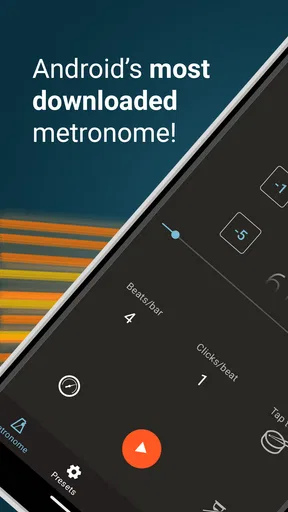
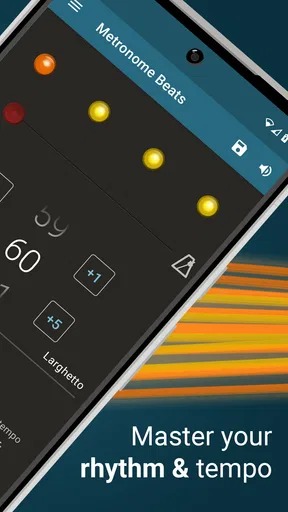
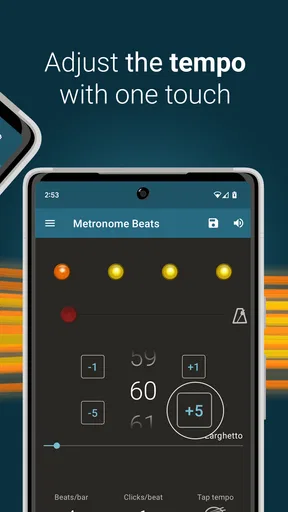
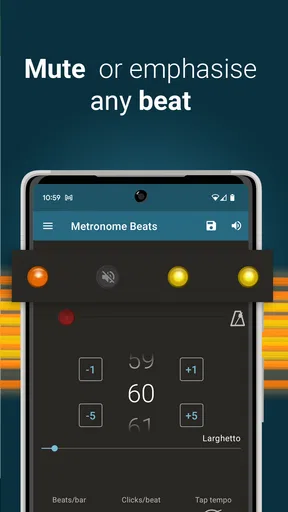
Our Review of Metronome Beats Pro
 Analysis by Appyee
When I choose a practice app, I want to know what it asks me to trust as well as what it helps me do. A metronome is a small tool, but it may sit open during lessons, rehearsals, or long stretches of practice, so I prefer a focused app over one that surrounds a simple click with unrelated extras. Metronome Beats Pro is a music and audio app from Stonekick, and its purpose is straightforward: help musicians keep time, work on tempo, and structure practice. Its long presence in app stores makes it a familiar option, but I still think it is worth judging by whether its controls and sound fit the way you actually play.
What I look for before relying on a practice app
A metronome does not need access to personal details to do its basic job, so my first step with any app is to look at the permissions and choices presented on my own device. Those can vary with the operating system and the installed version. I would not treat a reassuring interface, a long history, or a high rating as proof of a particular privacy practice; I would read the current permission prompts and make a choice based on what the phone actually asks.
That is especially sensible for a tool that may run while I am playing an instrument, when my attention is on a score or my hands rather than the screen. I prefer to settle any permission prompts before a session, decline anything that is not necessary for the way I intend to use the app, and check that the metronome still works as expected. This is a practical habit, not a claim that the app requests or avoids any particular permission.
Getting in Sync with Metronome Beats Pro
First things first, let’s talk about the setup process. Metronome Beats Pro is available on both Android and iOS, so no matter your device, you’re covered. Installing it is a breeze, and the app doesn’t take up much space, which is always a plus if you're like me and your phone is constantly nagging you about storage.
Once installed, you're greeted with a clean, intuitive interface. I love how easy it is to navigate. You don’t need to be a tech wizard to figure this out, which is great because I’d rather spend my time playing than fiddling with settings.
Features That Keep You on Beat
What really sets this app apart are the features. You can customize the tempo to any beat per minute (BPM) that your heart desires. Whether you’re playing a slow ballad or a fast-paced rock anthem, this app keeps up.
The visual beat indicators are a nice touch. If you’re in a noisy environment and can’t quite hear the click, just follow the visual cue. This is a lifesaver when you’re practicing with other musicians.
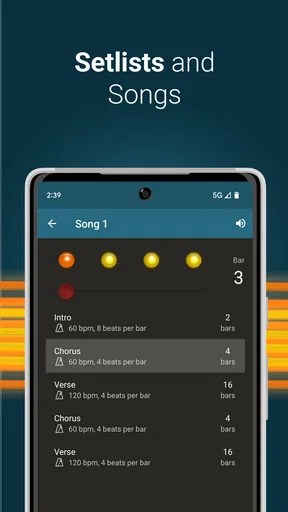
One feature I didn’t expect to love as much as I do is the built-in timer. You can set it to stop after a certain number of minutes, which is fantastic for timing practice sessions. It’s like having a personal coach telling you when to take a break. Plus, the option to save different tempos and time signatures for different songs is super handy.
Choosing a rhythm that teaches, not just counts
For a useful practice routine, I try not to leave the metronome at one comfortable speed for the whole session. I’ll start with a passage slowly enough to play cleanly, then raise the tempo in small steps only after I can repeat it without rushing. Saved song settings make that sort of routine easier to resume: I can keep a working tempo and time signature for each piece rather than rebuilding the setup every day.
The trade-off is that a steady click can expose timing problems without explaining how to fix them. If I repeatedly land ahead of the beat, I need to slow down, isolate the difficult bar, and listen to where the subdivision falls; simply turning the volume up is not a solution. I also find it useful to practice briefly with the visual cue and then with sound alone, so I am not depending entirely on one signal.
Playing Along with Ease
One of the most enjoyable aspects of Metronome Beats Pro is how seamlessly it integrates into your practice routine. It’s not just about keeping time; it’s about enhancing your entire practice experience. You can adjust everything with a simple swipe or tap, making it easy to stay in the flow of your practice session.
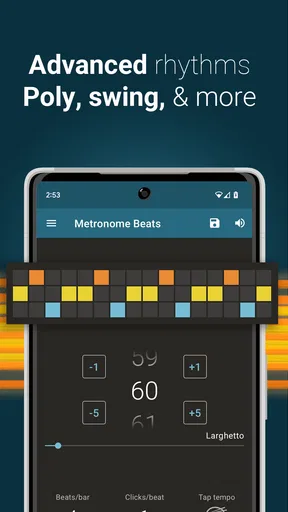
For those who love to experiment, the app offers complex time signatures and subdivisions. If you’re into progressive rock or jazz, this feature will be your playground. The app's ability to handle odd time signatures and polyrhythms makes it a versatile tool for any musician.
Where the extra rhythm tools earn their place
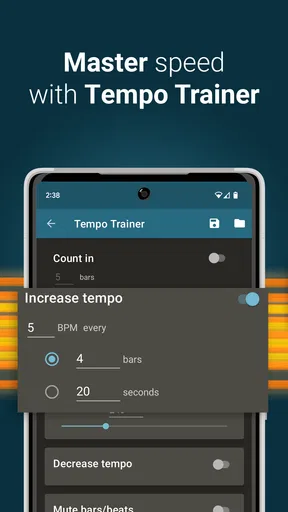
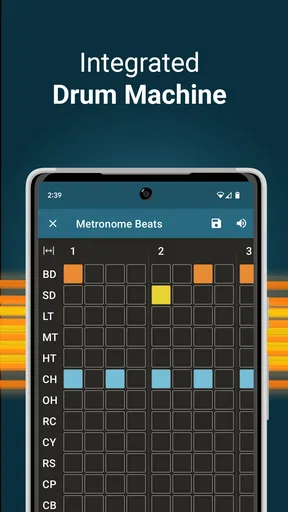
The drum machine and tempo-training angle are useful when I want more than a bare click, but they do not replace learning a part by ear or playing with a band. A drum pattern can make repetitive exercises feel more musical, while a tempo trainer gives practice a clear direction: work with a manageable pulse, then build speed deliberately instead of jumping to a performance tempo and hoping it holds together.
One practical approach is to use a plain click first to check the pulse, then switch to a more rhythmic backing only after the part is secure. That distinction matters because a fuller beat can make it easier to follow the groove while masking small timing slips. For a rhythmically exposed passage, I would return to the simpler reference before deciding that the exercise is solid.
A realistic practice session, from warm-up to stopping point
Imagine I have twenty minutes before leaving for a lesson and want to clean up a tricky section. I can open a saved setting for the piece, begin below the speed that usually makes me tense, and play the passage several times while watching the beat indicator. If I can keep the notes even, I can make a modest tempo increase; if I cannot, I stay put and focus on the transition that keeps pulling me off time.
The timer helps give that session a boundary, which is more useful than letting practice drift until I am tired and less attentive. I would use it as a reminder to stop and reassess, not as a promise that a fixed number of minutes is right for every musician. For a child learning to count, a short supervised exercise may be enough; a player preparing a difficult ensemble part may need longer pauses and a different plan.
How it compares with a basic click or a physical metronome
The usual alternatives each have a place. A simple metronome app can be the better choice if all I need is a pulse and I want the least setup possible. A physical metronome can be preferable when I want a dedicated device away from phone notifications, or when using a phone during practice would distract me. A full recording or drum track is more expressive, but it is less convenient when I need to change the tempo quickly while isolating a bar.
This app sits between those options: it offers more practice structure than a minimal click, while keeping tempo adjustments close at hand on a device I already carry. That flexibility is its strongest case, not a reason everyone should choose it. If your rehearsals depend on a particular sound, a visible pendulum, or a specialized setup, check that the app’s approach suits you before paying for it.
Verified choices matter more than assumptions
In everyday use, I would treat the app’s settings and the phone’s own controls as two separate things. I can choose a tempo and rhythm for practice, while the operating system governs permissions and other device-level decisions. When a prompt appears, I read it rather than tapping through automatically; if I change my mind later, I use the device’s settings to review the choice. I do not assume that a music tool needs account creation, nor do I assume it has no data practices worth checking. The responsible approach is to rely on the choices and disclosures actually shown to me.
This also affects where I use it. In a private practice room, I can keep the phone nearby and focus on the beat. In a lesson or shared rehearsal, I would avoid interrupting the group to inspect settings or adjust unrelated phone controls; it is better to prepare beforehand and keep the screen interaction brief. If privacy is a major concern, a standalone physical metronome may feel more comfortable simply because it is a separate device, even though that does not establish anything about an app’s data handling.
Who will get the most from it—and who may not
I see the best fit for learners who need a dependable pulse, instrumentalists working through passages at changing speeds, and players who want to keep separate tempo and time-signature setups for different songs. The visual indicator can help when the room is too noisy for a click to stand out, and the timer can bring a little structure to short, repeatable practice blocks. More experienced musicians may appreciate the subdivisions and unusual meters when a standard four-beat count is not enough.
I would skip it if I only need an occasional basic click and do not expect to use the extra practice tools, especially given the listed price of $9.99. I would also consider another option if having a phone beside me is a distraction, or if I need a specific hardware feel or a more elaborate rehearsal environment. A metronome can support good timing, but it cannot replace a teacher’s feedback, careful listening, or playing with other people.
What the app’s track record can—and cannot—tell me
Stonekick’s app has been available since Apr 19, 2012, and the current version is 7.1.0, with Android 6.0 as the minimum operating system listed. It has a 4.8 average from around 5K ratings, alongside 557 written reviews, and has reached over 50K installs. Those figures suggest that many people have chosen to use it, but popularity is not a substitute for checking whether the interface, controls, and sound work for your own instrument and routine.
The app is rated Everyone, which is useful context for families considering a practice tool, though I would still supervise a child’s device use in the usual way. The version and operating-system details are also worth checking before purchase: an older device may meet the stated minimum, but a musician should still confirm that the app behaves well on their particular phone or tablet. I would not buy solely because other players rate it highly; I would buy because I expect to use the tempo, rhythm, and session tools often enough to justify the cost.
Why Choose Metronome Beats Pro?
If you’re still on the fence about downloading this app, let me give you a nudge. The convenience of having a reliable metronome on your phone is unbeatable. No more lugging around a physical metronome; everything you need is right in your pocket.
The app is also ad-free, which is a huge bonus. Nothing kills a practice session like a pop-up ad for something you don’t need. Plus, the developers are continually updating the app, adding new features and ensuring compatibility with the latest devices.
Final Thoughts
At the end of the day, Metronome Beats Pro is more than just an app; it's a tool that can genuinely improve your musical skills. Whether you're a beginner trying to get the basics right or a seasoned pro looking to fine-tune your timing, this app has something for everyone.
So, if you haven’t already, give it a try. Your future self, with impeccable rhythm, will thank you. Trust me, once you start using Metronome Beats Pro, you’ll wonder how you ever practiced without it!
Verdict
Strengths of Metronome Beats Pro
- Highly accurate timing for precise practice.
- Customizable beat settings for flexibility.
- User-friendly interface enhances usability.
- Built-in visual cues support learning.
- Offers multiple time signature options.
Limitations of Metronome Beats Pro
- Ads can be intrusive during use.
- Lacks advanced rhythm exercises.
- Limited free features compared to paid version.
- May drain battery quickly on older devices.
- Occasional lag on low-performance devices.
Similar Picks in This Category
View All
YouTube Music
Google LLC4.4

Samsung Music
Samsung Electronics Co., Ltd.3.8

Spotify: Music and Podcasts
Spotify AB4.3

JioSaavn - Music & Podcasts
Saavn Media Limited4.3

Lark Player:Music Player & MP3
Lark Player Studio - Music, MP3 & Video Player4.6

StarMaker: Sing Karaoke Songs
SKYWORK AI PTE. LTD.4.3
Frequently Asked Questions
What features does Metronome Beats Pro offer that make it stand out from other metronome apps?
Metronome Beats Pro offers a range of features that cater to musicians of all levels. These include customizable beats per minute (BPM), a visual beat indicator, and the ability to create complex time signatures. The app also features a tap tempo function and allows for subdivision of beats, making it versatile for various musical practices.
Is Metronome Beats Pro suitable for beginners?
Absolutely. Metronome Beats Pro is designed to be user-friendly, with an intuitive interface that makes it easy for beginners to navigate. The adjustable tempo and clear visual cues help new musicians keep time effectively. Additionally, the app provides tutorials and tips to help users get started quickly.
Can I use Metronome Beats Pro for live performances?
Yes, Metronome Beats Pro is highly suitable for live performances. Its precise timing and ability to handle complex time signatures ensure it meets the demands of live settings. Moreover, the app's customizable settings allow users to adjust volume and tempo effortlessly during performances, making it a reliable tool on stage.
Does Metronome Beats Pro require an internet connection to operate?
No, Metronome Beats Pro does not require an internet connection to function. Once downloaded, all features are accessible offline, ensuring you can practice or perform without worrying about connectivity issues. This makes it a convenient choice for musicians who travel or perform in areas with limited internet access.
Is Metronome Beats Pro available for both Android and iOS devices?
Yes, Metronome Beats Pro is available on both Android and iOS platforms. The app is optimized for different devices, ensuring a smooth and consistent experience regardless of the operating system. Users can download the app directly from Google Play Store or the Apple App Store, providing convenience and accessibility.
